c4611_sample_explain
PDF B
S
OOKMARK
AMPLE
Sample Date:
May 2001
Prepared by:
Accelio Present Applied Technology
Created and Tested Using:
•
Accelio Present Central 5.4
•
Accelio Present Output Designer 5.4
Features Demonstrated:
•
Primary bookmarks in a PDF file.
•
Secondary bookmarks in a PDF file.
Overview
This sample consists of a simple form containing four distinct fields. The data file contains eight
separate records.
By default, the data file will produce a PDF file containing eight separate pages. The selective
use of the bookmark file will produce the same PDF with a separate pane containing
bookmarks. This screenshot of the sample output shows a PDF file with bookmarks.
The left pane displays the available bookmarks for this PDF. You may need to enable the
display of bookmarks in Adobe
Acrobat
Reader by clicking
Window > Show Bookmarks
.
Selecting a date from the left pane displays the corresponding page within the document.
Note that the index has been sorted according to the specification in the bookmark file, and that
pages within the file are created according to the original order in the data file.
PDF Bookmark Sample
Page 1 of 4
PDF B OOKMARK S AMPLE
Sample Date: May 2001
Prepared by: Accelio Present Applied Technology
Created and Tested Using: • Accelio Present Central 5.4
• Accelio Present Output Designer 5.4
Features Demonstrated: • Primary bookmarks in a PDF file.
• Secondary bookmarks in a PDF file.
Overview
This sample consists of a simple form containing four distinct fields. The data file contains eight
separate records.
By default, the data file will produce a PDF file containing eight separate pages. The selective
use of the bookmark file will produce the same PDF with a separate pane containing
bookmarks. This screenshot of the sample output shows a PDF file with bookmarks.
The left pane displays the available bookmarks for this PDF. You may need to enable the
display of bookmarks in Adobe Acrobat Reader by clicking Window > Show Bookmarks .
Selecting a date from the left pane displays the corresponding page within the document.
Note that the index has been sorted according to the specification in the bookmark file, and that
pages within the file are created according to the original order in the data file.
PDF Bookmark Sample Page 1 of 4
Sample Data File
Sample Bookmark File
^reformat
trunc
[invoices]
^symbolset
WINLATIN1
Invoices
by
Date=0
^field
trans_date
trans_date=1,A
2000-01-1
[type]
^field
description
Invoices
by
Item
Type=0
Description
for
item
#1
trans_type=1,A
^field
trans_type
[amount]
TYPE1
Invoices
by
Transaction
Amount=0
^field
trans_amount
trans_amount=1,D
11.00
^page
1
^field
trans_date
2000-01-2
^field
description
Description
for
item
#2
^field
trans_type
TYPE2
^field
trans_amount
11.00
^page
1
^field
trans_date
2000-01-3
^field
description
Description
for
item
#3
^field
trans_type
TYPE3
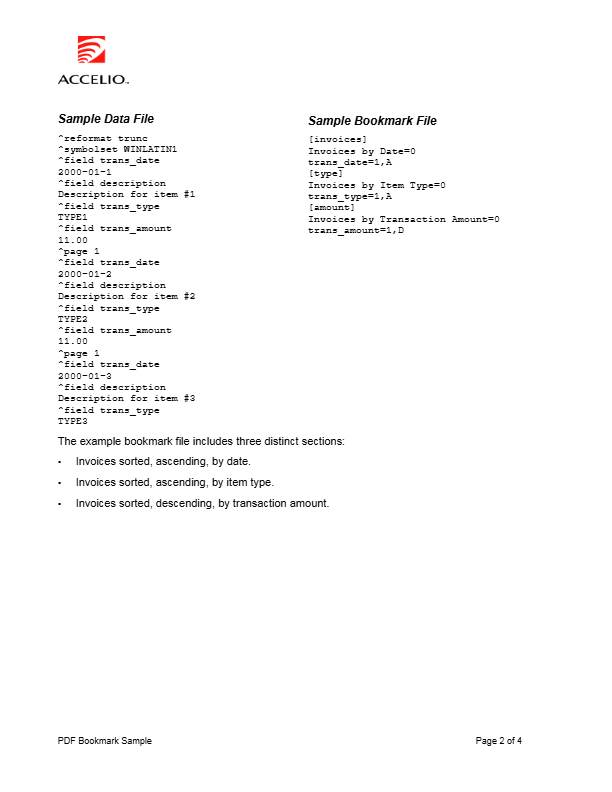
The example bookmark file includes three distinct sections:
•
Invoices sorted, ascending, by date.
•
Invoices sorted, ascending, by item type.
•
Invoices sorted, descending, by transaction amount.
PDF Bookmark Sample
Page 2 of 4
Sample Data File Sample Bookmark File
^reformat trunc [invoices]
^symbolset WINLATIN1 Invoices by Date=0
^field trans_date trans_date=1,A
2000-01-1 [type]
^field description Invoices by Item Type=0
Description for item #1 trans_type=1,A
^field trans_type [amount]
TYPE1 Invoices by Transaction Amount=0
^field trans_amount trans_amount=1,D
11.00
^page 1
^field trans_date
2000-01-2
^field description
Description for item #2
^field trans_type
TYPE2
^field trans_amount
11.00
^page 1
^field trans_date
2000-01-3
^field description
Description for item #3
^field trans_type
TYPE3
The example bookmark file includes three distinct sections:
• Invoices sorted, ascending, by date.
• Invoices sorted, ascending, by item type.
• Invoices sorted, descending, by transaction amount.
PDF Bookmark Sample Page 2 of 4
Sample Files
This sample package contains:
Filename
Description
ap_bookmark.IFD
The template design.
ap_bookmark.mdf
The template targeted for PDF output.
ap_bookmark.dat
A sample data file in DAT format.
ap_bookmark.bmk
A sample bookmark file.
ap_bookmark.pdf
Sample PDF output.
ap_bookmark_doc.pdf
A document describing the sample.
Deploying the Sample
To deploy this sample in your environment:
1.
Open the template design
ap_bookmark.IFD
in Output Designer and recompile the
template for the appropriate presentment target.
2.
Modify the
-z
option in the
^job
command in the data file
ap_bookmark.dat
to:
•
Identify the target output device.
•
Identify the bookmark file using the
-abmk
command.
•
Identify the section for which to generate bookmarks, if desired, using the
-abms
command.
For example,
To bookmark by Ö
Use the command line parameter Ö
Invoices
-abmk
ap_bookmark.bmk
-abms
invoices
Type
-abmk
ap_bookmark.bmk
-abms
type
Amount
-abmk
ap_bookmark.bmk
-abms
amount
PDF Bookmark Sample
Page 3 of 4
Sample Files
This sample package contains:
Filename Description
ap_bookmark.IFD The template design.
ap_bookmark.mdf The template targeted for PDF output.
ap_bookmark.dat A sample data file in DAT format.
ap_bookmark.bmk A sample bookmark file.
ap_bookmark.pdf Sample PDF output.
ap_bookmark_doc.pdf A document describing the sample.
Deploying the Sample
To deploy this sample in your environment:
1. Open the template design ap_bookmark.IFD in Output Designer and recompile the
template for the appropriate presentment target.
2. Modify the -z option in the ^job command in the data file ap_bookmark.dat to:
• Identify the target output device.
• Identify the bookmark file using the -abmk command.
• Identify the section for which to generate bookmarks, if desired, using the -abms
command.
For example,
To bookmark by Ö Use the command line parameter Ö
Invoices -abmk ap_bookmark.bmk -abms invoices
Type -abmk ap_bookmark.bmk -abms type
Amount -abmk ap_bookmark.bmk -abms amount
PDF Bookmark Sample Page 3 of 4
About this document
PDF B OOKMARK S AMPLE Sample Date: May 2001 Prepared by: Accelio Present Applied Technology Created and Tested Using: • Accelio Present Central 5.4 • Accelio Present Output Designer 5.4 Features Demonstrated: • Primary bookmarks in a PDF file. • Secondary book
- Views
- 13
- Format
- Web page
Tags
- may-june